
IP address search modifiers
Google Threat Intelligence allows you to perform advanced faceted searches over the historical collection of IP addresses seen by Google Threat Intelligence. These searches can act on basically all the metadata generated for IPs: autonomous system, country, whois, SSL certificate, community comments, detections, relationships, etc. For example, you can pivot on SSL certificate fields to try to identify other network infrastructure set up by a given adversary.
Google Threat Intelligence searches by default over the historical collection of files, in order to search over IPs you need to add the facet condition entity:ip. For example, let's ask for all those IP addresses that have been detected by more than 5 blocklists:
You can click on the filter icon inside the main search box in order to navigate to an IP address search assistant:
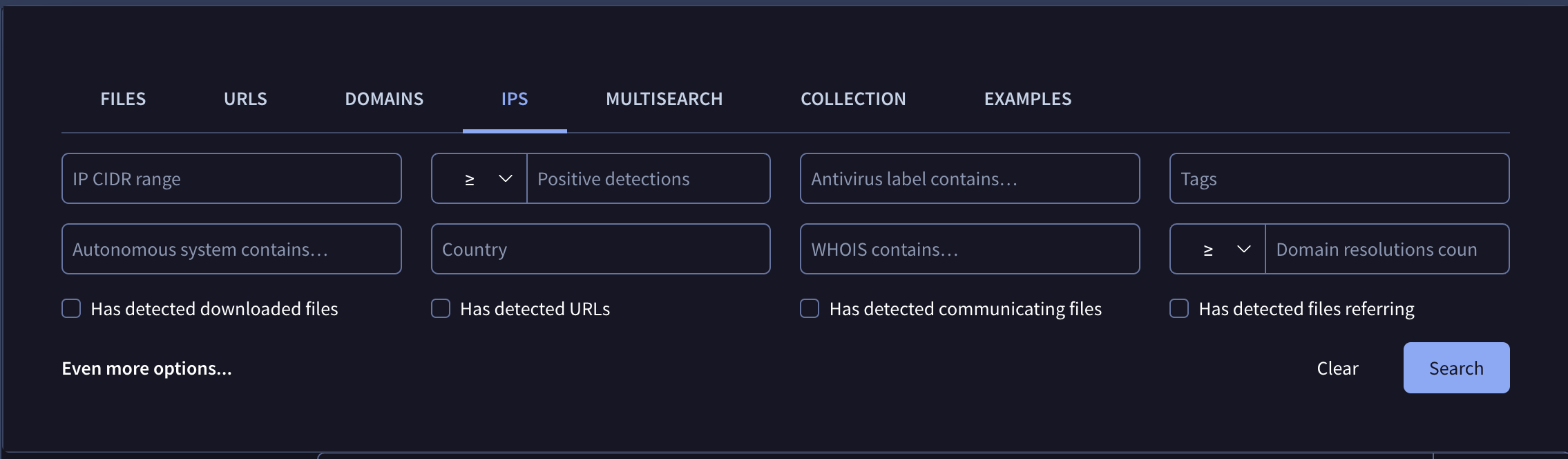
Note that the assistant will not allow you to build complex searches combining AND, OR and NOT conditions. For example:
entity:ip positives:5+ AND (aso:ovh OR aso:google)
The following table describes all the search modifiers (facets) that can be used, you can combine any number of them:
Port service fields (banner, product, version, CPE, OS, device type, fingerprint) are matched against the latest scan of each port only; only the latest scan of each port is indexed.
Port-Scoped Filtering vs. Combined ConditionsYou can optionally scope any port-service modifier (
protocol,port_protocol,port_banner,port_service_product,port_service_version,port_service_cpe,os_type,device_type,fingerprint) to a specific port usingmodifier[port]:value:
protocol[22]:ssh(orport_protocol[22]:ssh) ➔ Matches SSH specifically on port 22.protocol:ssh port:2222➔ Matches hosts with information on port 2222 AND running SSH on any port (not necessarily port 2222).
| Modifier | Description |
|---|---|
| ip | Narrow down a search to a given IP address range. Example: entity:ip ip:"8.8.8.8/24" |
| asn autonomous_system_number | Narrow down a search to a given autonomous system (by number). Example: entity:ip asn:"15169" |
| aso autonomous_system_owner | Narrow down a search to a given autonomous system (by organization). Example: entity:ip aso:google |
| country | Country where IPs matching a given criteria should be located. ISO ALPHA 2 code required. Example: entity:ip country:us |
| continent | Continent where IPs matching a given criteria should be located. ISO ALPHA 2 code required. Example: entity:ip continent:eu |
| comment | Search for IPs that have a Google Threat Intelligence Community comment containing the word or phrase provided. Example: entity:ip comment:phishing |
| comment_author | Search for domains that have been commented by the user with the username provided. Example: entity:ip comment_author:hugoklugman |
| p positives | Filter IPs according to the number of engines/blocklists that detect them. Less than and greater than syntax is allowed. Examples: entity:ip p:5+ |
| engines | Focus on IPs that have a given detection label by at least one blocklist/scanner. Example: entity:ip engines:phishing |
| <engine name> | Focus on IPs that are detected with a given label by a given blocklist/scanner. Example: entity:ip eset:phishing |
| reputation | Filter IPs according to their reputation among the Google Threat Intelligence user base. Example: entity:ip reputation:-20- |
| domain_resolutions_count | Search for IPs that have hosted a given number of domains. Accepts greater and less than syntax and saturates at a count of 100. Example: entity:ip domain_resolutions_count:20+ |
| detected_communicating_files_count | Fix a condition based on how many detected files have been seen contacting the given ip when executed in a sandbox. Less than and greater than syntax is allowed but the count saturates at 10. Example: entity:ip detected_communicating_files_count:5+ |
| communicating_files_max_detections | Fix a condition based on the maximum number of detections observed for files that communicate with a given IP. Example: entity:ip communicating_files_max_detections:30+ |
| detected_downloaded_files_count | Fix a condition based on how many detected files Google Threat Intelligence has downloaded from a URL hosted under a given IP address. Example: entity:ip detected_downloaded_files_count:10+ |
| downloaded_files_max_detections | Fix a condition based on the maximum number of detections observed for files that were downloaded by Google Threat Intelligence from a given IP address. Example: entity:ip downloaded_files_max_detections:20+ |
| detected_referring_files_count | Fix a condition based on how many detected files have been seen containing the given IP address in their strings. Example: entity:ip detected_referring_files_count:10+ |
| referring_files_max_detections | Fix a condition based on the maximum number of detections observed for files that contain a given IP address in their strings. Example: entity:ip referring_files_max_detections:10+ |
| detected_urls_count | Fix a condition based on how many detected URLs have been seen hosted under a given IP address. Example: entity:ip detected_urls_count:10+ |
| urls_max_detections | Fix a condition based on the maximum number of detections observed for URLs hosted under a given IP address. Example: entity:ip urls_max_detections:5+ |
| tag | Filter IPs according to their tags. Example: entity:ip tag:reserved List of available tags: - private: private IP address space, e.g. 192.168.0.1. - multicast: IP address in the multicast range. - link-local: IP valid only for communications within the network segment. - reserved: reserved IP address space. - loopback: IP for the local machine. For a complete list of tags, seeFull list of Google TI tag modifier |
| ssl_issuer | Focus on IPs that contain a given string or fulltext pattern within their SSL certificate issuer field. Example: entity:ip ssl_issuer:"Starfield Secure Certificate Authority - G2" |
| ssl_serial | Focus on IPs that share a given SSL certificate serial field. Example: entity:ip ssl_serial:"99c942e5f4049537" |
| ssl_subject | Focus on IPs that contain a given string or fulltext pattern within their subject field. Example: entity:ip ssl_subject:"naranjamarketing.com" |
| ssl_thumbprint | Focus on IPs sharing a given SSL certificate thumbprint field. Example: entity:ip ssl_thumbprint:62cd39d8b06d1d26e02e7fc8fabe7cb442e08489 |
| whois | Filter IPs according to any word or phrase contained within their Whois record. Example: entity:ip whois:"Hurricane Electric LLC" |
| have | Allows you to fix a condition that the IP’s indexed metadata should meet, it accepts any of the modifiers above and it means that the IP should have data for a given modifier. Example: entity:ip have:comment |
| last_modification_date lm | Filter IPs based on the latest update on Google Threat Intelligence for IP. Example: entity:ip last_modification_date:3d+ |
| jarm | Filter IPs based on the JARM fingerprint. Example: entity:ip jarm:29d3fd00029d29d21c42d43d00041d188e8965256b2536432a9bd447ae607f |
| ssl_not_before | Filter Domains based on the start date of the last SSL certificates' validity. Example: entity:ip ssl_not_before:2023-10-01 |
| ssl_not_after | Filter Domains based on the end date of the last SSL certificates' validity. Example: entity:ip ssl_not_after:2023-10-01 |
| threat_actor related_actor | Filter Domains which have that related threat actor. Example: entity:ip threat_actor:apt29 |
| gti_score | Google Threat Intelligence assessment threat score. Example: entity:ip gti_score:30+ |
| gti_severity | Google Threat Intelligence assessment severity of the IOC. Example: entity:ip gti_severity:high |
| gti_verdict | Google Threat Intelligence assessment verdict of the IOC. Example: entity:ip gti_verdict:benign |
| port | Filter IPs with scan information on a given port. Takes a single port number. Example: entity:ip port:443 |
| open_port | Filter IPs with a specific port currently open. Takes a single port number; ranges such as 8+ are not accepted.Example: entity:ip open_port:3389 |
| closed_port | Filter IPs with a specific port currently closed. Takes a single port number; ranges are not accepted. Example: entity:ip closed_port:22 |
| port_status | Filter IPs by a port's status. Accepts open or closed.Example: entity:ip port_status:open |
port_bannerport_banner[port] | Filter IPs by the banner returned by the service on a port (latest scan). Example: entity:ip port_banner:"nginx/1.18.0" Pivoted example: entity:ip port_banner[22]:"OpenSSH" |
os_typeos_type[port] | Filter IPs by the operating system identified for the service on a port (latest scan). For SMB services the value is the Windows build number. Example: entity:ip os_type:linux Pivoted example: entity:ip os_type[445]:"10.0.20348" |
device_typedevice_type[port] | Filter IPs by the device class identified for the service on a port (latest scan). Example: entity:ip device_type:router Pivoted example: entity:ip device_type[80]:router |
protocolprotocol[port] | Filter IPs by the application protocol running on a port (e.g. http, https, ssh, rdp, smb). Same as port_protocol.Example: entity:ip protocol:ssh Pivoted example: entity:ip protocol[80]:http |
port_protocolport_protocol[port] | Filter IPs by the application protocol running on a port (e.g. http, https, ssh, rdp, smb). Same as protocol.Example: entity:ip port_protocol:ssh Pivoted example: entity:ip port_protocol[22]:ssh |
port_service_productport_service_product[port] | Filter IPs by the product (software) of the service running on a port (latest scan). Example: entity:ip port_service_product:apache Pivoted example: entity:ip port_service_product[80]:apache |
port_service_versionport_service_version[port] | Filter IPs by the version of the service running on a port (latest scan). Example: entity:ip port_service_version:2.4.41 Pivoted example: entity:ip port_service_version[80]:2.4.41 |
port_service_cpeport_service_cpe[port] | Filter IPs by the CPE identifier of the service running on a port (latest scan). Example: entity:ip port_service_cpe:"cpe:/a:openbsd:openssh:7.6p1" Pivoted example: entity:ip port_service_cpe[22]:"cpe:/a:openbsd:openssh" |
fingerprintfingerprint[port] | Filter IPs by the SSH host key fingerprint or RDP fingerprint of the service on a port (latest scan). Example: entity:ip fingerprint:3199205810ee96dcb3bfae109c944f44 Pivoted example: entity:ip fingerprint[22]:3199205810ee96dcb3bfae109c944f44 |
Updated 4 days ago